
 Quick addArden Linen Overshirt$124.003 colours
Joomla ecommerce development
Joomla ecommerce development for stores that need to fit the site you already run
If your website already runs on Joomla, adding ecommerce should feel like an extension of the same CMS, not a second system bolted beside it. We plan the catalogue first, choose the commerce extension around the way you sell, then shape the template, checkout and admin workflow so the store makes sense to customers and to the people who will manage it after launch.
- Commerce built into your Joomla CMS
- VirtueMart, HikaShop and extension planning
- Self-hosted access and data ownership

Joomla online store setup
Joomla online store setup starts with the catalogue, not the template
A Joomla online store setup works best when the product structure is settled before anyone starts styling pages. We map categories, variants, pricing rules, languages and customer groups, then decide how the store should sit inside the existing site. That gives the design a job to do. It also tells us whether VirtueMart, HikaShop or another maintained Joomla extension is the better fit for the catalogue and the version of Joomla you already run.
What the store needs to get right
-
Information architecture
Products, categories and content have clear homes inside the CMS.
-
Product structure
Variants, options, pricing and stock follow rules your team can maintain.
-
Navigation
Menus use the language customers look for when they are ready to buy.
-
Category logic
Collections narrow a choice instead of repeating the whole catalogue.
-
Product page
Images, specifications, options, delivery and returns appear in the order buyers need them.
-
Mobile usability
The store is checked at phone width before the desktop layout gets the final polish.
-
Cart and checkout
Payment, shipping and tax rules are configured around how the business actually trades.
-
Extensions and integrations
Every Joomla extension has a reason to be there and a maintenance path after launch.
The buying journey
Four moments shape whether the store feels easy to buy from
Customers do not experience your extension list or your admin panel. They experience a collection page, a product page, a cart and a checkout. We design those four moments as one path, with each screen answering the question that appears next.
-
01
Collection
The collection page is where most shoppers first meet the catalogue. Categories, filters and sorting need to match the way people describe what they want, while product cards should answer enough questions to make the next click obvious. Price, availability, key options and useful imagery belong here. When the grouping is clear, a large catalogue feels manageable instead of crowded.
-
02
Product
A product page should make the buying decision easier, not force a customer to open five tabs. We organise the gallery, price, variants, specifications, delivery information and returns around the questions buyers ask in real life. The template then carries that same standard across the catalogue, which saves your team from rebuilding the layout every time a new product is added.
-
03
Cart
The cart confirms the choice and makes the next step plain. Quantities can change without losing progress, delivery expectations are visible early, and any rules around minimum orders, coupons or shipping are handled before the customer reaches payment. This is also where Joomla shopping cart extensions and add-ons need restraint. If an extension adds friction, it is solving the wrong problem.
-
04
Checkout
Checkout is configured around the commerce extension and the way your business takes orders. We set the fields, payment methods, shipping rules, tax settings and order emails, then test real scenarios across devices. The goal is simple: a customer should know what they are paying, where the order is going and what happens next without having to stop and work it out.


VirtueMart development services
VirtueMart Development Services for Joomla Stores That Need More Than Defaults
Joomla gives you several ways to add commerce, which is useful until a store is built around the wrong one. We compare the catalogue, pricing rules, multilingual needs, payment options and the current Joomla version before we recommend an extension. That decision comes first because changing the commerce engine later is a migration, not a settings change.


Selected Joomla ecommerce work
Commerce that feels like part of the site
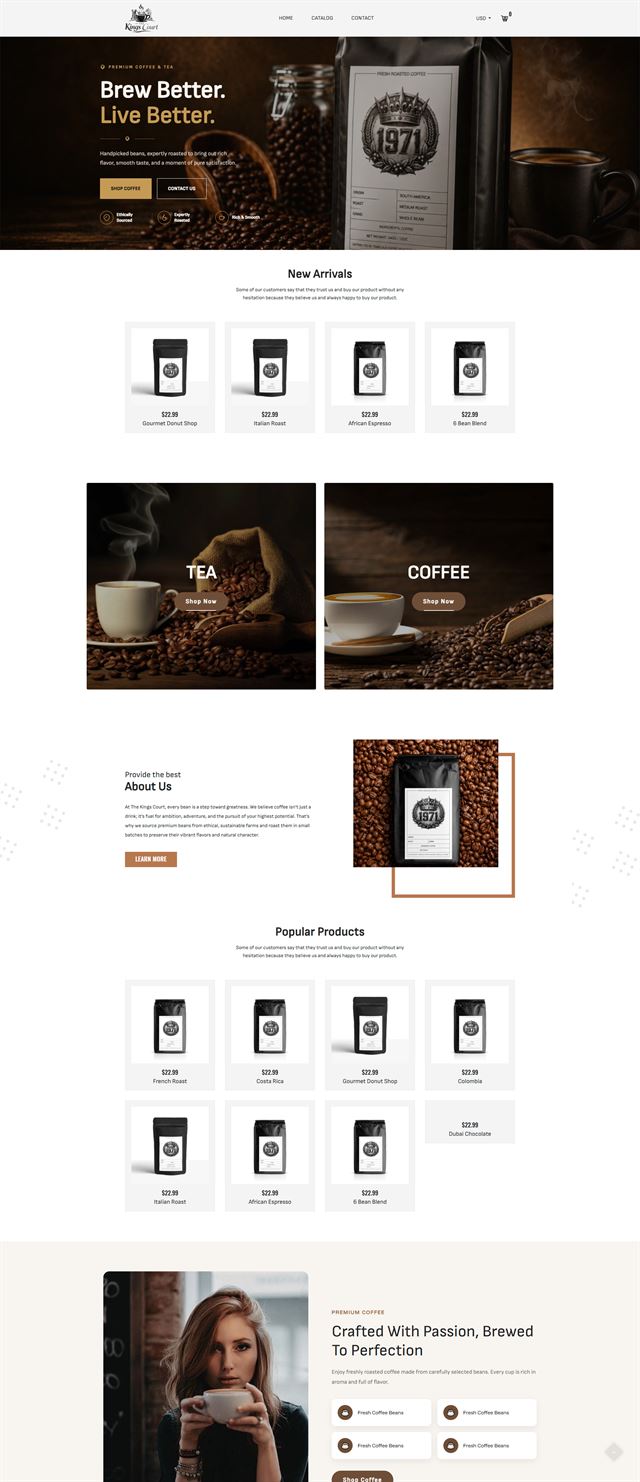
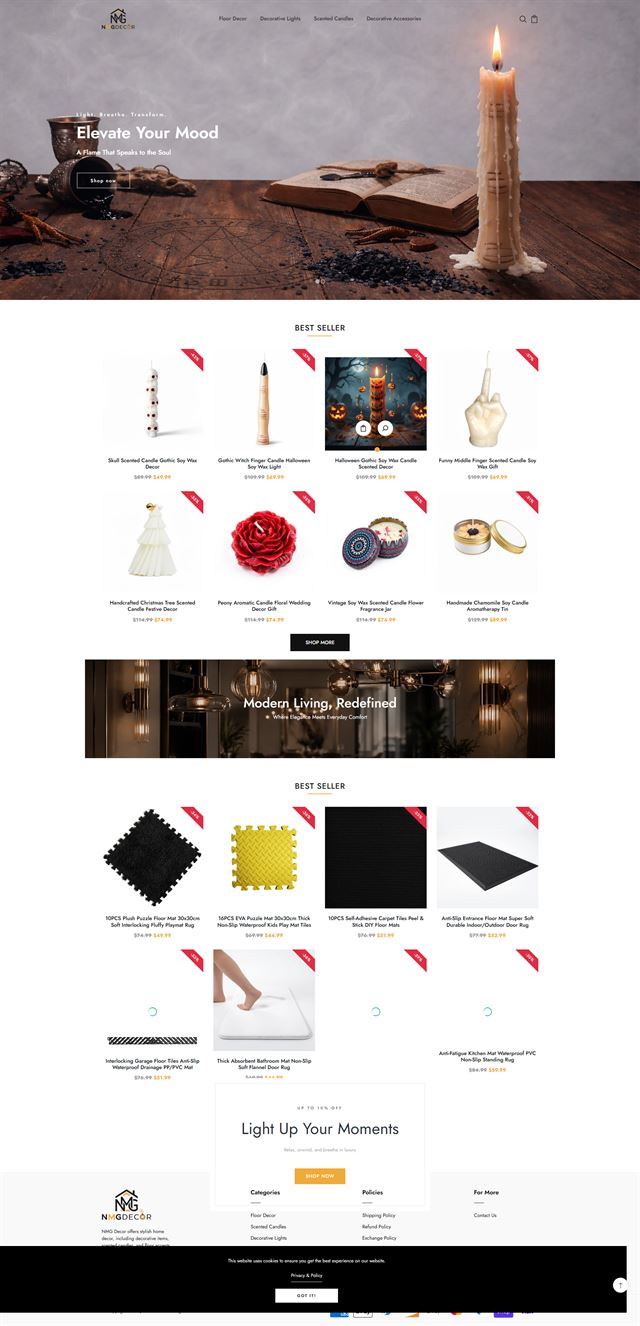
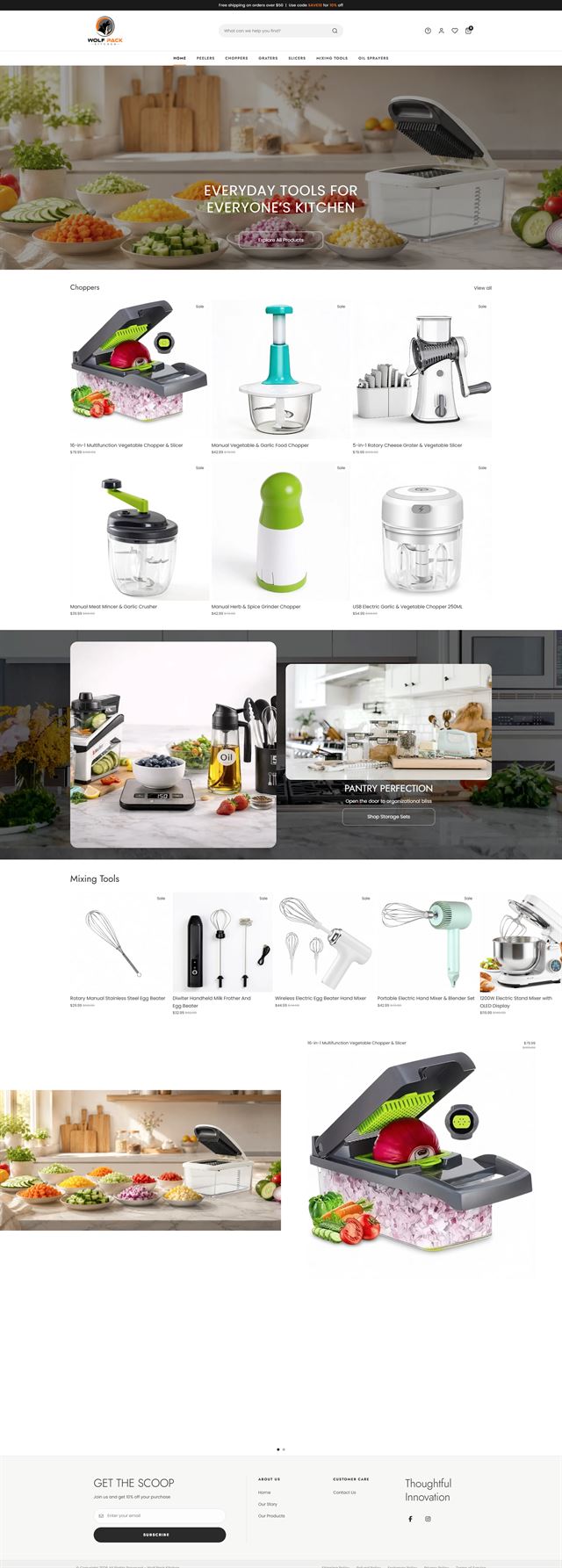
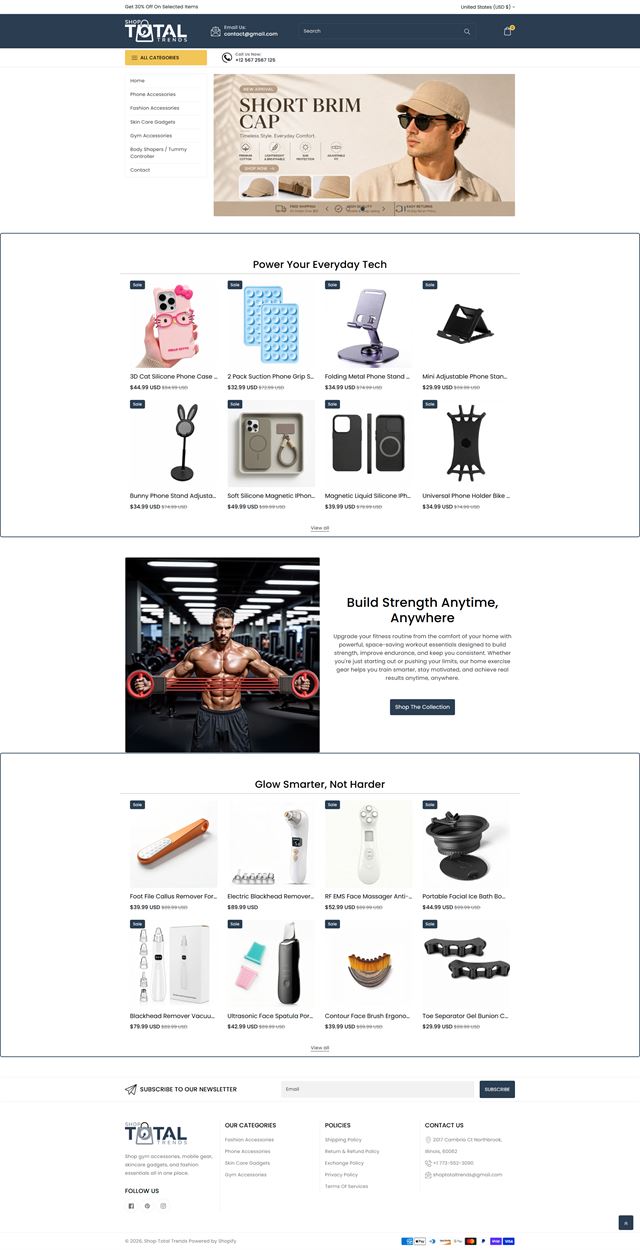
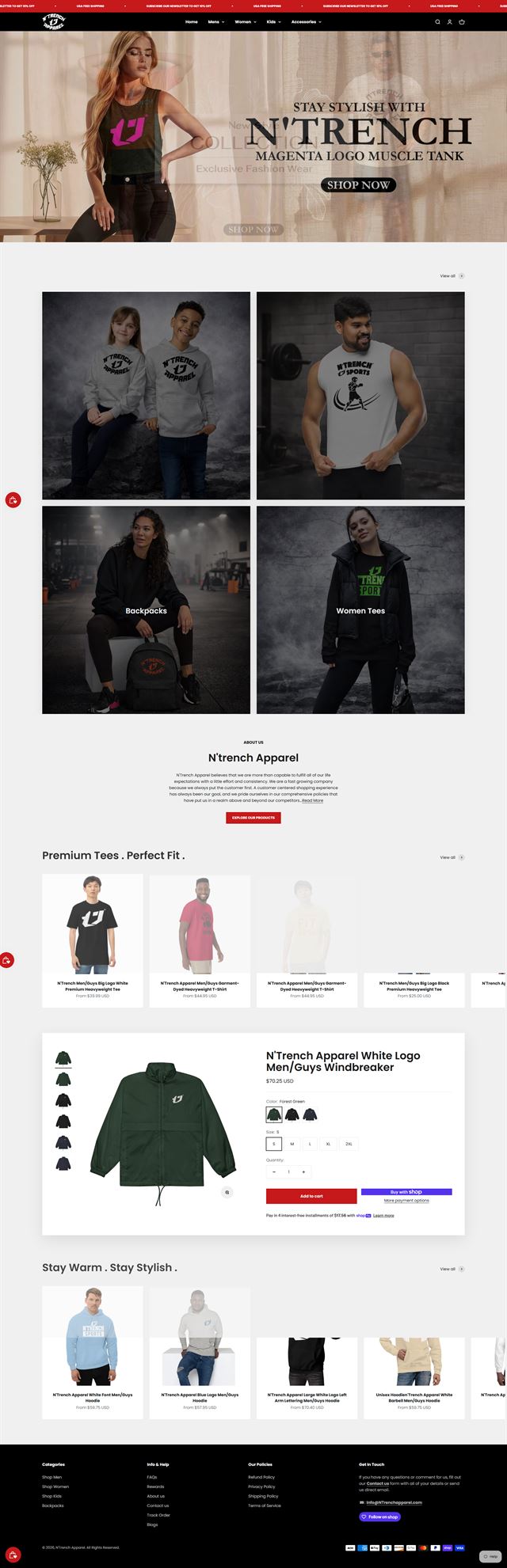
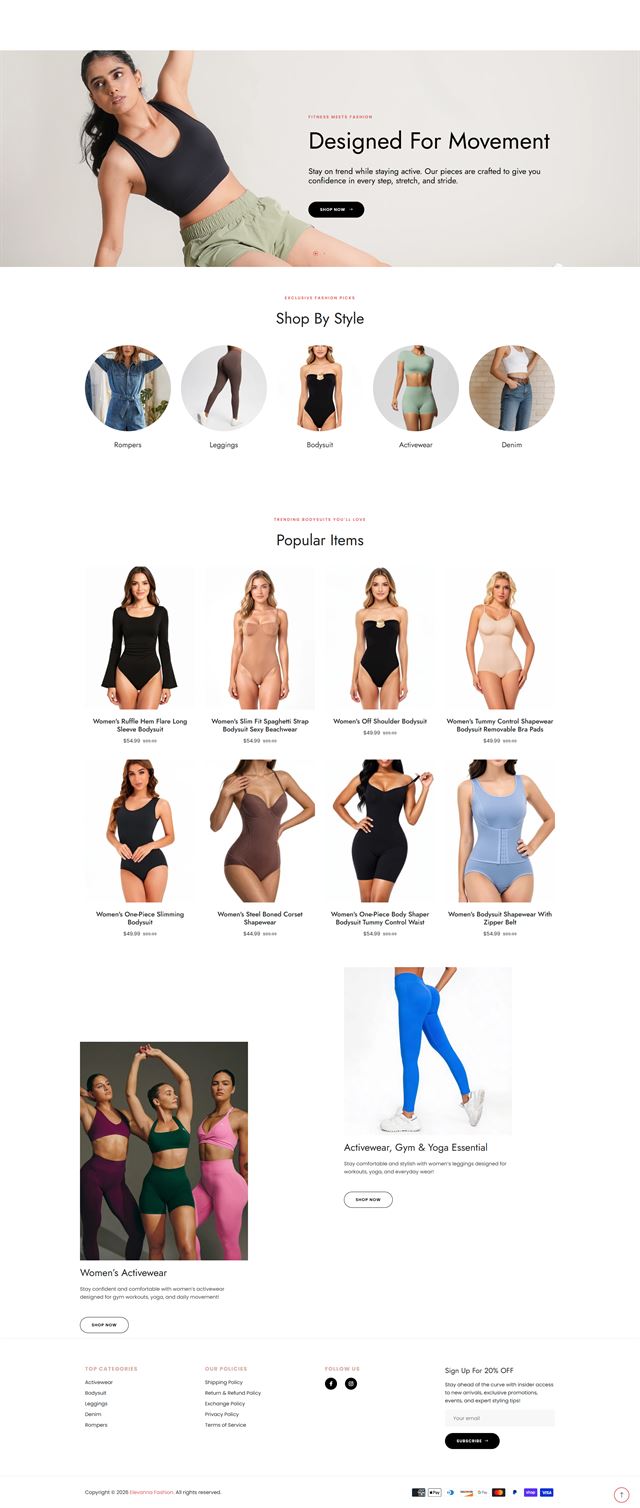
The work shown here reflects the kind of Joomla ecommerce projects we build and reshape: existing CMS websites that need a real store, older catalogues that have outgrown their current setup, and businesses that need the shop to follow the same content, language and access rules as the rest of the site. Some projects centre on VirtueMart development services. Others use HikaShop or a different maintained extension because the catalogue, checkout or admin workflow calls for it. We may rebuild category and product templates, simplify the navigation, replace outdated Joomla extensions, clean up mobile behaviour, or connect payment and shipping tools that already matter to the operation. The visual result changes from project to project. The underlying standard does not. Customers should feel that the shop belongs on the site, and your team should be able to manage products, content and orders without fighting the CMS each time something changes.
Before the build
Five decisions that keep a Joomla store out of rework
Before development starts, we put five decisions in writing: catalogue structure, buying journey, navigation, integrations, and access and ownership. That gives the project a stable base before templates, extensions and checkout rules are configured.
What you sell, and how it divides
We start with the product data you already have. Product types, variants, options, attributes, pricing rules and stock behaviour tell us how the catalogue should be structured inside Joomla. This is where we catch gaps that would otherwise surface halfway through upload, when changing the model is slower and more expensive.
Discuss your store
How your customer actually decides
A buyer may care about size, compatibility, delivery time, technical detail or a strong photograph. The product page has to know which of those questions comes first. We map that decision before the template is built, then use the same logic across categories and products so the store feels consistent as the range grows.
Discuss your store Use the words your customers look for
Joomla menus can become complicated when a site has grown for years. We simplify the path to products around the terms customers recognise, then decide where categories, editorial content and store pages belong. New products should have an obvious place without creating another top level menu item every season.
Discuss your store What the store has to talk to
Payments, shipping, tax, email, analytics and any business system already in use need to be considered before development starts. We also check whether the required Joomla extensions are maintained for your version. Where custom work is needed, we define what data moves, when it moves and what happens if one system is unavailable.
Discuss your store Who controls hosting, users and extensions
The site stays on hosting in your name, with staging, backups and administrator access agreed before development. We work through Joomla user groups instead of shared master logins. Extension licences, renewal details and any custom code are documented so the people running the store know what they own and what needs maintenance.
Discuss your store Ecommerce development across leading platforms and marketplaces
We provide ecommerce store development across leading platforms and marketplaces, including Shopify, WooCommerce, WordPress, BigCommerce, Magento, Wix, Squarespace, Webflow, OpenCart, Drupal, Joomla, eBay, Etsy and TikTok Shop. Whether you need a new store, a redesign, a migration or help improving an existing storefront, we shape the structure, product experience and integrations around the way each platform works so customers can browse and buy with less friction while your team has a store that is practical to manage.
-
 Shopify
Store development
Shopify
Store development
-
 WooCommerce
Store development
WooCommerce
Store development
-
 WordPress
Ecommerce development
WordPress
Ecommerce development
-
 BigCommerce
Store development
BigCommerce
Store development
-
 Magento
Store development
Magento
Store development
-
 Wix
Ecommerce development
Wix
Ecommerce development
-
 Squarespace
Ecommerce development
Squarespace
Ecommerce development
-
 Webflow
Ecommerce development
Webflow
Ecommerce development
-
 OpenCart
Store development
OpenCart
Store development
-
 Drupal
Ecommerce development
Drupal
Ecommerce development
-
 Joomla
You are here
Joomla
You are here
-
 eBay
Store development
eBay
Store development
-
 Etsy
Shop development
Etsy
Shop development
-
 TikTok Shop
Shop development
TikTok Shop
Shop development
How we build
From store strategy to launch
The build moves in stages so each decision is made when it is still cheap to change. The fifth pre-build decision, access and ownership, is confirmed before development so hosting, staging, user roles and extension licences are clear from the start.
-
01
Discovery
We review the business, the existing Joomla site, the catalogue and the way orders are handled today. The scope is written down before design begins.
-
02
Store architecture
Categories, navigation, page hierarchy and product relationships are agreed before the template work starts.
-
03
UX and visual direction
We translate the brand into store rules for product presentation, spacing, mobile behaviour and the states customers see while they shop.
-
04
Joomla ecommerce development
We build or adapt the template, configure the chosen commerce extension, create the product and category structure, and set the user groups your team needs inside the CMS.
-
05
Products, extensions and integrations
Products, payment methods, shipping, tax and supporting Joomla extensions are configured and connected against the agreed store rules.
-
06
Testing
We test mobile and desktop journeys, variants, cart behaviour, payments, shipping scenarios, forms and order emails before launch.
-
07
Launch
The live domain, redirects, policies, notifications and analytics are checked, then the store goes live with a practical first week plan.
-
08
Refine
Once customers start using the store, real behaviour tells us what deserves the next round of work. We adjust from evidence instead of guessing before launch.
Questions
Before you commit to the build
These are the questions that usually come up when a business is deciding whether Joomla ecommerce is the right next step.
-
That depends on the catalogue, Joomla version, pricing rules, multilingual needs and the features you actually need. We compare maintained options such as VirtueMart and HikaShop during scoping instead of choosing by habit.
-
Yes. For many Joomla businesses, that is the sensible route. We review the current CMS, template, menus and extensions, then build the store into the site so customers keep one domain, one navigation system and one content experience.
-
Yes. We can set up or rebuild VirtueMart catalogues, product templates, checkout rules, payment and shipping connections, and the surrounding Joomla template work. We first check whether VirtueMart is the right fit for the store you are planning.
-
Yes. HikaShop can be a good fit for some Joomla stores, particularly when its product, pricing or workflow options match the project more closely. We treat the extension choice as part of architecture, not as a late plugin decision.
-
Yes, after an audit. Legacy platform support depends on the Joomla version, template, commerce extension, custom code and whether the attached extensions still have maintained upgrade paths. We tell you what can stay, what should move and what the migration would involve before quoting the rebuild.
-
Yes. Products, categories, customer data, content and redirects can be planned for migration. The exact route depends on the platform you are leaving and the quality of the source data, so the migration is scoped before development starts.
-
Yes. We configure the extensions the store genuinely needs, check version compatibility and test payment, shipping and tax scenarios before launch. If two extensions overlap or create unnecessary maintenance, we simplify the stack.
-
Yes. Joomla is self-hosted, and we can work on hosting, staging and administrator access held in your name. Your site, database, product data and customer records remain under your control.
-
Yes. Product entry, categories, content and user access are structured so routine changes stay inside the CMS. We also document the extension setup so your team knows which parts are safe to edit and which changes need development support.
-
Timing depends on catalogue size, the condition of the existing site, the chosen commerce extension, data readiness, integrations and approvals. A straightforward build moves faster than a legacy migration. We give a realistic schedule after the discovery review.
Ready to build?
Add ecommerce to Joomla without starting your website again
Adding a store to an established Joomla CMS, replacing an outdated setup or planning a migration all start with the same thing: a clear catalogue, a maintained extension path and a build your team can manage after launch.
Bring your Joomla version, current extension list, approximate catalogue size and any payment, shipping or business systems the store must use. If you already have VirtueMart or HikaShop, include the version and any custom overrides. We will review the setup, explain the build we would recommend, flag legacy issues that should be handled first and tell you whether the existing commerce layer is worth keeping.